
There is no store-published application for this platform, so a phone user has two routes: open the site in the browser and pin it to the home screen as a shortcut (PWA), or install an APK file on Android. This guide explains both in plain steps and shows where the real risk sits. Because the operator works from abroad, the address changes from time to time, so always build the shortcut from a verified address. The content is meant for readers aged 18 and over.
- How Nakitbahis Works on a Phone
- Adding a Home-Screen Shortcut (PWA)
- Installing the Android APK
- iPhone and iPad
- Security Habits for Phones
- Common Mobile Problems
- FAQ
How Nakitbahis Works on a Phone
The site opens in a responsive layout that rearranges itself for a small screen. Sportsbook coupons, slots and live tables share a single account, and the balance is the same on every device. Speed is the main benefit; the main danger is that a small screen hides most of the address bar. For that reason take the address only from the announcement channel and apply the checks on the current address page.
Adding a Home-Screen Shortcut (PWA)
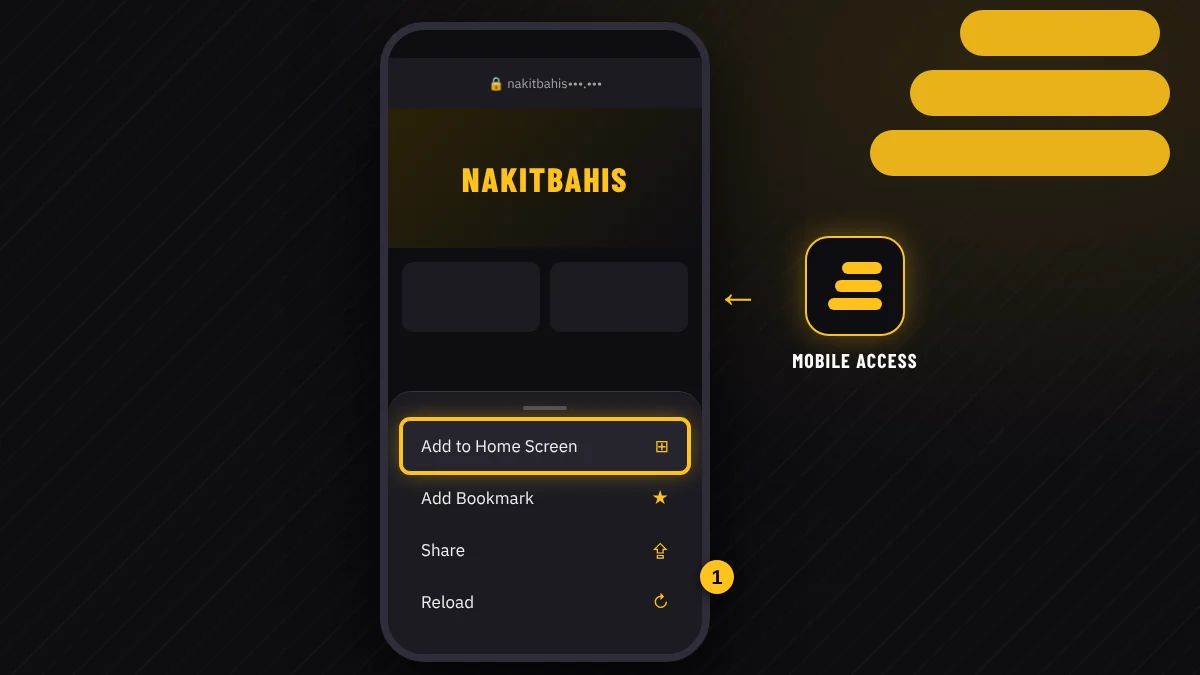
A PWA lets the browser open the site in full screen like an app. It installs no extra file, needs no store and can be deleted in one tap.
- Open the verified address in your phone browser by typing it yourself.
- Open the browser menu: three dots on Android, the share icon on iPhone.
- Choose "Add to Home Screen".
- Confirm the name and tap the new icon to open the site.
A shortcut remembers the address from the moment it was made. If the domain changes, the old icon stops working; verify the new address, delete the icon and create a fresh one.
Installing the Android APK
The Android file is an installation package from outside any store. Download it only from a channel that the brand itself has verified; files found through search results or private messages can contain malware. Installation requires you to allow "unknown sources" temporarily, and you should switch that setting off again afterwards. Compare the file size and the signature details with what the announcement states. After installing, review the permissions: a gaming platform has no reason to read your contacts or messages, so deny anything that does not fit.
iPhone and iPad
There is no store app for iOS. Open Safari, load the verified address and use the share icon, then "Add to Home Screen". The same works on iPad. Keep iOS updated, because old versions can raise certificate warnings. If you use another browser, the shortcut option may appear under a different menu name.
Security Habits for Phones
Turn on screen lock and biometric unlock. Avoid payments over public Wi-Fi. Save passwords in the browser only on a device that is yours. Keep the system and the browser updated. If the phone is lost, change the e-mail password and the account password first, then contact support. Allow notifications only from official channels, and never open a link sent by a stranger, however friendly the message.
Common Mobile Problems
If the page will not open, retry on mobile data and compare the address with the announcement. If the layout looks broken, clear the cache. If a shortcut shows an error, delete it and rebuild it. If the session drops when you switch from Wi-Fi to data, reload the page. If a live stream freezes, close background apps and check your signal.
FAQ
Does Nakitbahis have a mobile app?
There is no application published in the stores. Mobile access works through the browser, a home-screen shortcut (PWA) and an APK file for Android. Treat any other file that circulates under the brand name with suspicion, and use only links from the brand's verified channel.
How do I add the PWA shortcut?
Open the verified address in your browser, tap the menu and choose "Add to Home Screen", then confirm the name. On iPhone the option sits under the share icon, and on Android under the three-dot menu. A shortcut installs no file and must be rebuilt when the address changes.
Is the Android APK safe?
Safety depends on the source. Use only the file offered through the brand's verified announcement, compare its size with the announcement, and grant no unnecessary permissions. Switch off the unknown-sources setting after installation. If you have doubts, the PWA shortcut is the lower-risk option.
What if the address changes while I use the shortcut?
Verify the new address through the announcement channel, delete the old shortcut and add a new one. Your account and balance stay the same, and you log in with the same username and password. Typing the address by hand is the safest protection against copies.
For phones the rule is short: take the address from the announcement, build the shortcut yourself and download files only from verified sources. For login details see the login page, and for the game sections see the games page. Treat play as entertainment and fix a limit before you start.
This site contains affiliate links. Our ratings are independent of any commission we receive.